Schedules Endpoint
The Schedules endpoint is designed to retrieve Gracenote TV schedules, organized by station identifier (programming service ID, or prgSvcId) and UTC datetime.
The Schedules schema provides timeslot-level information, including:
- prgSvcId, for linking to station details in Sources API
- TMSId, for language-specific representation of program on schedule
- Datetime, specified in UTC for simple conversion to display timezones
- Schedule ratings, from ratings boards in airing area, if available
- Content rights, to support client specific use cases such as Instant Restart, User Recordings, Mobile Viewing
- Additional timeslot qualifiers, such as CC, HDTV, Live
All schedule days are marked with a unique updateId, denoting current information for station’s schedule on that date. Changes to any timeslot within the 24-hour schedule day will result in assignment of a new updateId, which allows you to pull deltas since last retrieval of schedule information. Scope of schedules can be requested by subset of stations in particular country, lineup, or custom station list, and a consistent window of schedule day updates is continuously available for request. For example, customers who choose to receive 21-days of schedules for US and Canadian stations will receive a continuous stream of updates, with new schedule days and stations automatically added to the stream of updates.
Schedules Endpoint Data Structure and Relationships
Schedules Schema
Review the following XML schema definition (xsd) to learn about the data structure, fields, and types for this endpoint.
To explore the relationships among all endpoints, see the interactive schema documentation.
XML Schema URL
http://files.api.gracenote.com/xsd/on_update_schedules_3.26.xsd
The following tables list key data elements of the Schedules endpoint. Unless stated otherwise, the XPATH in the tables below is relative to on/schedules/schedule/
Identifiers
| XPATH Element/Attribute | Description | ID Space |
|---|---|---|
| @prgSvcId | Gracenote unique identifier for the station/programming service | prgSvcId |
| @date | Air date in YYYY-MM-DD format, UTC | - |
Timeslot / Event Data
Ratings
Parental rating is an optional element of an event. The airing ratings are provided to Gracenote by sources and may or may not be present. Programs may have their own (Gracenote-curated) parental ratings which can be used as a fallback.
| XPATH Element/Attribute | Description | Example |
|---|---|---|
| event/tv/tvRating/ | TV parental rating for the event | TV14 |
| event/tv/tvRating/@body | The ratings body that issued the parental rating guidelines | USA Parental Rating |
For programmatic usage, the ratings bodies and warnings are enumerated in the Data Dictionaries and Controlled Vocabularies endpoint, under RatingsBody and RatingAdvisory types.
Qualifiers
Qualifiers are labels that provide additional information about the airing, such as the technical details about the format; whether this is a live airing or if it’s shown with a delay; whether it is a premiere or replay; subtitles/dubbing info etc.
Notable qualifiers are listed below. Please refer to the Supplemental Controlled Vocabulary (auto-download) for a full list of qualifiers and their definitions.
Exact Start/End Times and Duration
Exact start/end time and exact duration values are provided to Gracenote by sources and may or may not be present; they are exposed as available for entitled clients. These fields identify when a linear program truly aired and how long it aired for. The values may be different from the published start time and duration of the program.
| XPATH Element/Attribute | Description | Example |
|---|---|---|
| event/@exactStart | Source-provided exact start time of a scheduled event | 01:27:08 |
| event/@exactDur | Source-provided exact duration of a scheduled event | PT01H26M14S |
| event/@exactSource | The source of the exact time information | Broadcaster |
| event/@exactStartDateTime | The exact start datetime of a program in UTC | 2024-07-20T01:27:08Z |
| event/@exactEndDateTime | The exact end datetime of a program in UTC | 2024-07-20T02:53:22Z |
Broadcast Identifiers
Broadcast ids (also can be referred to as Remote / Source / Provider ids) are identifiers that Gracenote receives from its linear schedule providers. These identifiers are typically used for matching Gracenote data to provider data, they can be of different types (e.g. program, event, series etc), the types vary depending on the provider. Broadcast Identifiers are optional and exposed as available, some are available by entitlement.
| XPATH Element/Attribute | Description | Example |
|---|---|---|
| event/broadcast/id/ | Broadcaster-specific identifier for the event | 2679283, 200090296, 422390 |
| event/broadcast/id/@type | Broadcast identifier type | remoteId, remoteSeriesId, remoteEventId |
Referenced CV Lists
The following Schedules value lists are enumerated in the Data Dictionaries and Controlled Vocabularies Endpoint:
- Ratings
The following Schedules value lists are documented in the Supplemental Controlled Vocabulary (auto-download):
- Qualifiers
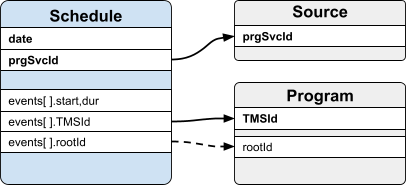
Entity Relationship Diagram
The following diagram illustrates the references from a schedule record to other objects within the On API.
API and Example Responses
API
http://on-api.gracenote.com/v3/Schedules
?updateId=[updateId value]
&limit=[limit value]
&api_key=[your-api-key]
Request Parameters
Important: Use lookup calls for QA and troubleshooting purposes only. Gracenote does not support lookup APIs for Client production environments.
Example Requests
Return schedules updated since last delta request, in batches of 1000 station days.
http://on-api.gracenote.com/v3/Schedules?updateId=2948902&limit=1000&api_key=<your-api-key>
Return full schedules for two stations for specified 10 day window.
http://on-api.gracenote.com/v3/Schedules?prgSvcId=10098,10003&startDate=2017-05-01&endDate=2017-05-11&api_key=<your-api-key>
Note: Only stations and dates within a configured customer stream are returned. For example, customers receiving 21-day schedules for stations in USA/CAN lineups can request any schedule within that range. Any requested stations or dates outside configured range are not included in a response.
Example Responses
Also see: Schedules XML examples
Schedules Updates
You can retrieve schedules using:
- updateId - Unique update token, used to retrieve schedules modified since last request, sequenced by updateId. Can be combined with limit to ingest specified batch size
- prgSvcId and date range -Retrieve specific schedule records, sequenced by prgSvcId and date. To be used for evaluation and troubleshooting purposes, not programmatic ingestion
When API is used in ‘lookup’ mode using prgSvcId and date range, requests for schedule data outside the pre-configured station list and schedule window will not be retrievable. Only schedules within customer station list and schedule window are returned. To modify pre-configured station list or schedule window, contact your Gracenote representative to modify your configuration.
The most granular update block within schedule data is the station day (prgSvcId + date). Schedules are included on day in which event started. For timeslots which cross date boundary (for example, a show which begins at 23:00 and ends at 01:00 next day), the schedule will always appear within station day corresponding to schedule start time.
Automatic extension of stream date range will occur daily at midnight UTC. A full set of additional station days are assigned updateIds and become available in update result sets.
Updates are returned in 24-hour blocks. Individual timeslots are not marked with any update indicator . Entire daily station schedule in user datastore should be overlaid with newly updated data.
Automatic Updates to Station List and Schedule Window
The pre-configured station list is automatically updated to include new stations when they are either added to, or become eligible for, the custom update stream. Existing stations may become eligible for custom update stream if they newly meet filter criteria defined on customer requirements (for example, new station appears on lineup).
Schedules for the newly added/eligible stations are automatically seeded (assigned new consecutive updateIds) and received as normal updates within Schedule Update processing. When stations are removed or fall out of pre-configured station criteria, Schedules API will not include ‘deleted’ indicator, but will no longer issue updates for the station, and the removed stations will not be returned in lookups.
Similarly, the pre-configured schedule window (for example, 7-days, 14-days, etc) will also be automatically handled with new updateIds assigned to schedules (station days) as they cross into the eligible schedule window.
Note: Updates to schedules within pre-configured date range is included. For example, on a 7-day schedule stream, with 1-day buffer on each end, API calls on 5/10/2025 will return updated schedules from 5/9/2025 through (and including) 5/17/2025. Any updates made to schedule dates prior to 5/9/2025 are excluded.
Schedules Feature Details
This section provides additional information about specific Schedules features, including response types and sample output.
Exact Start and Duration
Exact start time and exact duration values are exposed as available for entitled clients.
These fields identify when a linear program truly aired and how long it aired. The values may be different from the published start time and duration of the program.
The exact source attribute can have two different values:
- Broadcaster: These are the exact start and duration values provided by the source (broadcaster) to Gracenote.
- Media Distillery: These are the exact start and duration values provided by an EPG correction service. This is an additional service available from Gracenote.
If you are entitled to Media Distillery data, Media Distillery data overwrites Broadcaster provided data if both are available on a channel.
The sample data below has both Broadcaster and Media Distillery data.
Content Rights
Content Rights (or Usage Rights) are metadata associated with linear TV schedule events. They define the content's availability for various consumer use cases on a target distribution platform, such as a streaming service or MVPD.
Content Rights are usually specific to one distribution platform, whether it be an MVPD’s service or a D2C streaming service, and describe what broadcasters or content owners allow the platform to do with events appearing in the linear TV programming.
Note: Access to Content Rights data requires an entitlement. If you do not see Content Rights data, please contact your Gracenote representative. Availability of Content Rights data also varies by Channel and Schedule Event.
Content Rights
The table below shows Content Rights from Gracenote’s controlled vocabulary (CV). Content Rights define content availability and usage for linear TV schedule events. This list will be extended when new use cases are added. Value formats are boolean (True/False).
|
Content Right |
Also known as... |
Definition |
|---|---|---|
|
Catchup Allowed |
Replay, Lookback, Backwards EPG, Reverse EPG |
The CR defines whether or not users can watch content in a given linear timeslot through Catchup from a centralized network copy in a given timeframe |
|
Downloading Allowed |
Sync & Go, Download to own |
The CR defines whether or not Downloading of the content airing in the given linear timeslot to a mobile end user device (e.g. mobile phone, laptop, tablet) is allowed. This enables users to watch the content, usually for a defined time period, without an internet connection. |
|
Instant Restart Allowed |
Startover, Restart, |
The CR defines whether or not users can start playing content in a given linear timeslot after the official scheduled start time but while the content is still broadcasting |
|
Live Viewing Allowed |
|
The CR defines whether or not users can watch the live broadcast for the content in a given linear timeslot |
|
Mobile Viewing Allowed |
Mobile Blanking, Blackout |
The CR defines whether or not users can view the content in a given linear timeslot on their phone or tablet using an application from the service provider |
|
Off Net Viewing Allowed |
Non-Access Usage |
The CR defines whether or not users can watch the content in a given linear timeslot outside of the provider's network |
|
Open Access Allowed |
Unscrambled/Cleared |
The CR defines whether or not the given linear timeslot has Open Access enabled and is therefore "free to watch" |
|
PPV Allowed |
Pay per View |
The CR defines whether or not users can purchase the content in a given linear timeslot for viewing for a price specified by the content provider |
|
Screen Mirroring Allowed |
|
The CR defines whether or not Screen Mirroring (through a device like Apple AirPlay or Google Chromecast) is allowed for the given linear timeslot |
|
Side Loading Allowed |
|
The CR defines whether or not Side Loading (transfer of file without internet connection) is allowed for the given linear timeslot |
|
Streaming Allowed |
OTT |
The CR defines whether or not Streaming is allowed for the given linear timeslot |
|
Trick Mode Allowed |
Trick Play, FFWD/SkipAhead, Trickmode Suppression |
The CR defines whether or not users can pause, fast-forward and/or rewind content in a given linear timeslot |
|
User Recordings Allowed |
NPVR or PVR |
The CR defines whether or not users can create personal recordings, either in the cloud (NPVR) or on a personal device (PVR) for the content in a given linear timeslot |
Content Rights Parameters
Content Rights can include one or more of the following parameters. The parameters listed below can be associated with multiple Content Rights. Each Content Right can have multiple parameters assigned for scheduled events:
|
Content Right Parameter |
Value Format |
Definition |
|---|---|---|
|
Currency |
ISO 4217 3-letter currency code |
The CR parameter defines the currency tied to the Content Rights Parameter (e.g. Price) for a specific timeslot |
|
string |
The CR parameter defines any device types for which the Content Right (e.g. Downloading Allowed) tied to a specific timeslot is applicable for |
|
|
Expire Duration |
Integer |
The CR parameter defines the duration for which the Content Right for a specific timeslot applies (e.g. NPVR Catchup) |
|
OS Type |
string |
The CR parameter defines any OS types for which the Content Right (e.g. Downloading Allowed) tied to a specific timeslot is applicable for |
|
Out of Home Allowed |
Boolean |
The CR parameter defines whether or not the Content Right (e.g. Streaming Allowed) tied to a specific timeslot applies out-of-home |
|
Price |
float |
The CR parameter defines the price tied to the Content Right (e.g. PPV) for a specific timeslot |
|
Promotion |
Boolean |
The CR parameter defines whether or not a promotion code can be applied by users to purchase the given PPV event for a specific timeslot |
|
string |
The CR parameter defines the storage type for user recordings (e.g. User Recordings Allowed with type "NPVR" or "PVR") for a specific timeslot. |
|
|
Subscription Code |
Integer |
|
|
Time Unit |
string |
The CR parameter defines the time unit (seconds, minutes, hours) tied to the Content Rights Parameter (e.g. Expire Duration) for a specific timeslot. |
|
Window End |
ISO 8601 date/time |
The CR parameter defines the windowend (last day) tied to the Content Right (e.g. PPV) for a specific timeslot |
|
Window Start |
ISO 8601 date/time |
The CR parameter defines the windowstart (first day) tied to the Content Right (e.g. PPV) for a specific timeslot |